Previously I wrote about my approach to home automation. Layered on top of that is my approach to controlling it through my homelab. My current rack is a 43U beast that is stacked as follows:
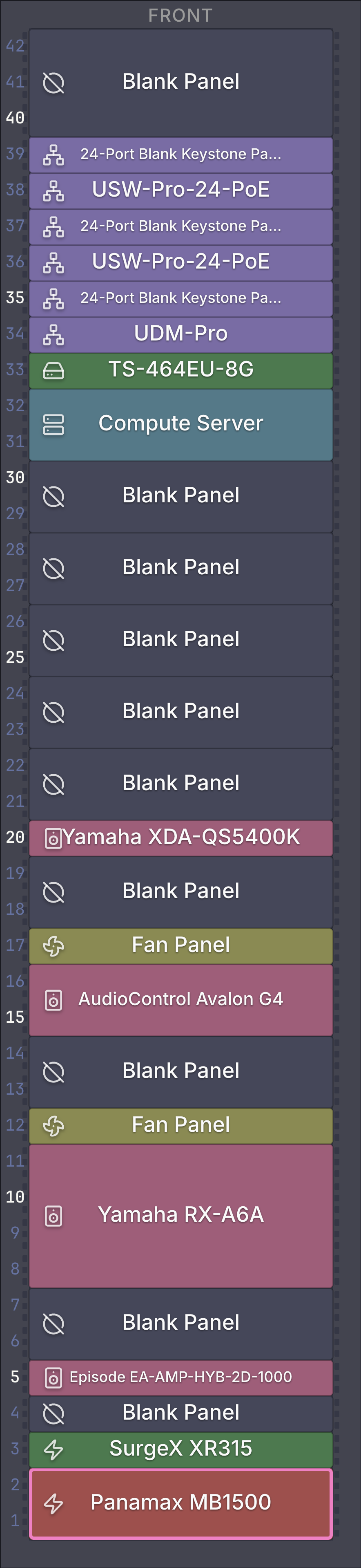
It's not the cleanest; I left space for later expansion.
Power
I find homelab blogs don't talk much about power. We have a whole-home battery backup that can keep the house running for about a day if we lose power. In addition, there is an UPS in the rack that powers the networking gear, and a surge protector for the heavier A/V bits.
As part of the remodel, I had two 20-amp circuits run to the back of the rack. One of these circuits feeds the UPS, while the other feeds the surge protector.
As I was expanding the rack, I realized I needed better power distribution. While there are a number of horizontal rackmount solutions, I wanted to use a 0U (vertical) solution. With two 20-amp circuits, I wanted a power strip that could handle the potential load, as well as use two separate circuits for two separate banks of power outlets. It took a while to find, but I finally found this Tripp Lite power strip. As a bonus, it has a small segmented LCD display for the current power draw.
Networking
I'm going to skip the home theater bits and focus on the networking side of things. With the remodel, I was able to have ethernet wired throughout the house. I realize now that I should have had more, spare drops placed throughout the house in places I didn't really expect to use them. Also, I should have expected to need double the amount of switching and patch panels than I had originally planned.
Regardless, this is where it is today. The wired network looks like CenturyLink > UDM Pro > USW-Pro 24 PoE #1 > USW-Pro 24 PoE #2 > USW Aggregation. The wired network supports 8 security cameras, 7 Wi-Fi access points, and currently about 30 wired clients. The wireless network supports an additional ~40 wireless clients. I currently do not have a multi-WAN set up as I haven't found service to go down enough to justify it.
I originally started with only the QNAP storage server, but after a couple of years, compute just couldn't keep up with the demands of Home Assistant, Plex, Frigate, and nightly backups. I expanded the server solution to the 2U compute server, which I'll write about another time.
Servers
The QNAP storage server runs Unraid which has been really great to use. I've found performance to be solid, though 8GB of memory feels fairly constrained when you're running any containers. The QNAP, when running Unraid, has needed a number of reboots when running up against resource limits. But, since moving most containers over to a new computer, the QNAP has been much more reliable.
The compute server runs plain Debian Trixie.
Management
For a long time, I was manually managing the configuration on the QNAP server, but it was becoming very tedious and somewhat time consuming. I finally made the switch to storing an Ansible configuration in a git repository and I really wish I had made the switch sooner. While not perfect, it's very ergonomic and can manage deployment very well across a number of machines. Combining Ansible with Claude has enabled me to do a lot more with my homelab configuration, which I will post about another time.